
ITEC 4770: App Architecture with Components, DB Model, and User Objects, Study notes of Information Technology

This document from the itec 4770 client/server systems course explores application architecture, focusing on the importance of analysis and design, component/deployment model, database model, and user centric object model. Topics include preventing duplicate code, promoting understanding, making weaknesses visible, using interfaces and soap for object communication, and creating data and user centric objects. The document also covers naming conventions, creating stored procedures, and adding functionality to the presentation tier.

Typology: Study notes

Pre 2010

Uploaded on 08/04/2009

koofers-user-6tr
koofers-user-6tr 🇺🇸

10 documents

1 / 4

Toggle sidebar

This page cannot be seen from the preview

Don't miss anything!

bg1
ITEC 4770 Client/Server Systems
Chapter 3 – Application Architecture
1. Application Architecture
a. Importance of analysis and design
i. Prevents duplicate code
ii. Allows code reusability
iii. Promotes understanding - developers can see where their code fits into the
overall scheme
iv. Makes weaknesses in design visible before coding takes place
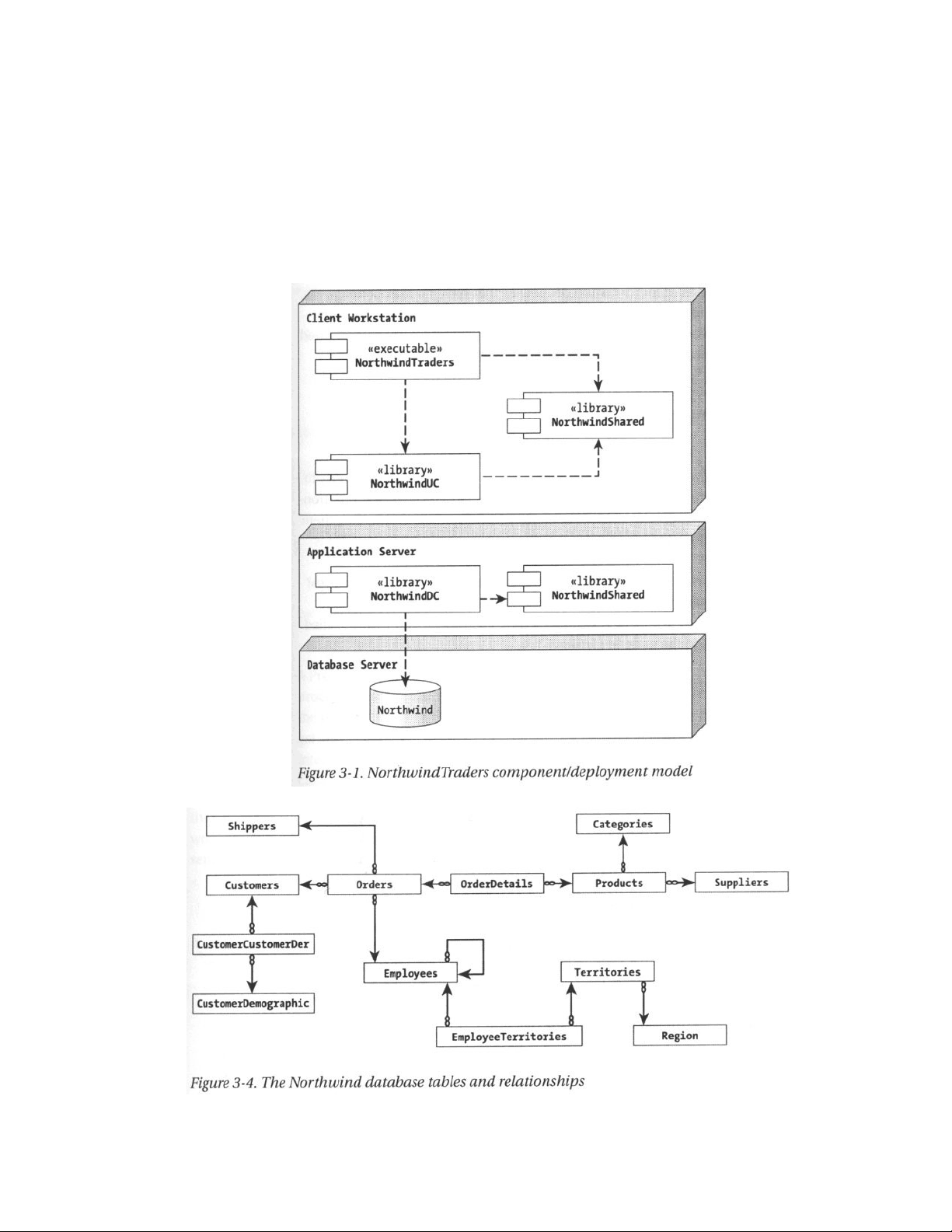
b. Component/Deployment Model
2. Database model
3. Data centric object model (dependency: a dotted line with an arrow at the end)
Page 1 of 4
pf3
pf4

Partial preview of the text

Download ITEC 4770: App Architecture with Components, DB Model, and User Objects and more Study notes Information Technology in PDF only on Docsity!

Chapter 3 – Application Architecture

  1. Application Architecture a. Importance of analysis and design i. Prevents duplicate code ii. Allows code reusability iii. Promotes understanding - developers can see where their code fits into the overall scheme iv. Makes weaknesses in design visible before coding takes place b. Component/Deployment Model
  2. Database model
  3. Data centric object model ( dependency : a dotted line with an arrow at the end)

Chapter 3 – Application Architecture

  1. User centric object model ( composition : filled diamond. When an object (filled diamond) controls the life time of another object)
  2. Option Explicit and Option Strict (pg 54)
  3. Object Communication using Remoting a. Using an interface to access an object (see page 46)

Chapter 3 – Application Architecture a. Inherits System.Collections.DictionaryBase : an object that allows to store pairs (key, value) and to retrive a value when the key is given. Sub Add (key As Object, value As Object) Private Property Item (key As Object) As Object (Load function pg 81)

7. Creating frmListBase (pg87) and a derived class frmRegionList : An UI object that displays all regions in RegionMgr

Adding basic Functionality to presentation tier

1. Add all columns in lvwList ListView object into the cboColumn ComboBox object.(pg 96): frmListBase_Load 2. Add Find Functionality to frmListBase (pg 97): btnFind_Click 3. Add Sorting Functionality to frmListBase a. Create an ListViewColumnSorter object that implements IComparer interface (pg 98) which has one method: Function Compare (x As Object, y As Object) As Integer: Utilities.vb b. Pass that object to the lvwList ListView object. (pg 99). The ListView object knows how to sort itself as long as you tell it how any two rows are ordered. c. Implement lvwList_ColumnClick (pg 100) 4. Implementing the Print Functionality (pg 101)

Some finishing touches…

  1. Resizing the ListView columns when frmListBase is resized. (pg 108)
  2. Add protected overridable empty stubs for Delete and Edit buttons in frmListBase (pg
  3. Creating frmEditBase , frmRegionEdit forms. This forms allow the user to edit a Region : add regions and update the region description
  4. When adding a region, AddButton_Click (pg 115) is called. This creates an frmRegionEdit form to add the region.
  5. When editing a region, EditButton_Click (page 118) is called. This creates an frmRegionEdit form to add the region. a. b. Both these functions modify the Region object frmRegionList. mobjRegion through its Save method. mobjRegion object triggers an event ObjectChanged event in Region.Save method (pg 76), which event is handled in frmRegionList.mobjRegion_ObjectChanged. method (pg 116)
  6. frmRegionList.DeleteButton_Click (pg 120) deletes a region. mobjRegionMgr is used to lookup the Region objects to be deleted or edited.