Computer Networks: Hardware, Naming, and Internetworking, Lecture notes of Computer Networks

A lecture on computer networks and the internet. It discusses the geometric topology and physical medium used to connect computers together. It also covers different naming schemes used to identify computers on the internet, such as physical or MAC addresses, IP numbers, and hostnames. The lecture ends with a discussion on ports, which are used to identify specific programs on a computer.

Typology: Lecture notes

2022/2023

Uploaded on 05/11/2023

anoushka
anoushka 🇺🇸

4.1

(15)

241 documents

1 / 6

Toggle sidebar

This page cannot be seen from the preview

Don't miss anything!

bg1
Lecture #8: Networks (Hardware and Naming)
CS106E Spring 2018, Young
In this lecture we take a look at Computer Networks and the Internet. We begin by looking
at how Computer Networks are defined by their geometric topology and the physical
medium used to connect them together. As we discover the Internet is an Internetwork,
composed of many different types of networks. Information travelling through networks,
and particularly through internetworks, are subject to lag and latency.
We learn that there are many different naming schemes used to identify computers on the
Internet. These include Physical or MAC Addresses, IP Numbers, and Hostnames with each
naming scheme serving a different purpose. Ultimately, traffic on the Internet needs an
IP Number, and Hostnames are converted to IP Number via the Domain Name System
(DNS). We end our discussion of names by taking a look at Ports, which are used to identify
specific programs we want to communicate with on a computer.
Topology and Medium:
When we create a computer network, we need to define its topology and choose a physical medium
to connect the computers or devices on the network.
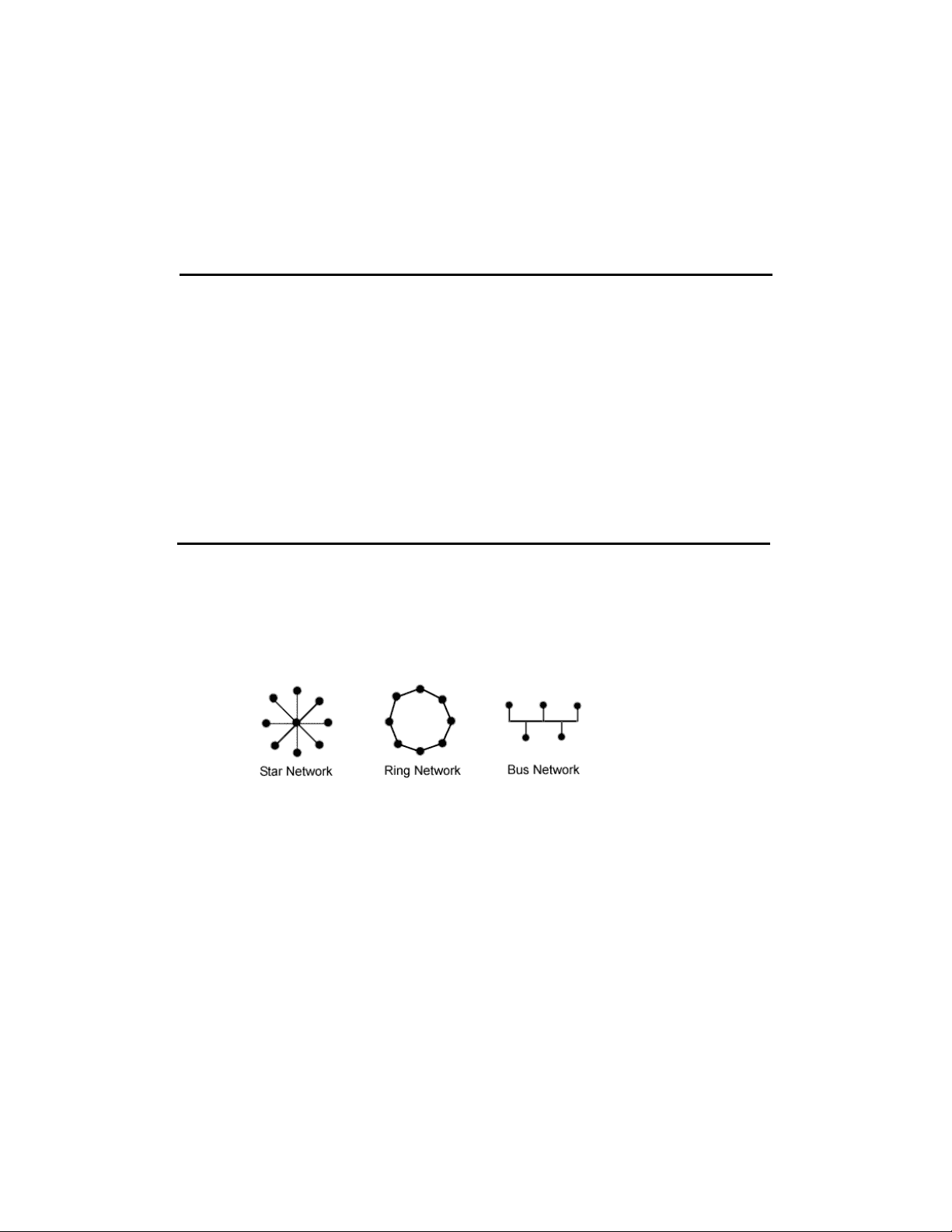
The topology is basically the geometric shape that connects the computers together. Here, for
example, are three classic network topologies:
In a Star Network each network node is connected to a central node. As its name implies, in a Ring
Network the nodes are connected together in a ring. In a Bus Network, all the nodes are connected to
a single shared wire.
Each network topology has strengths and weaknesses. For example:
- If a computer in the Star network drops out, the network still works fine, unless the central
node goes out, in which case the network goes down. This topology is probably the one most
familiar to students, as it’s the topology of a WiFi network. All computers on the WiFi network
connect to a central node, which is the Wireless Router.
- Similarly, devices in a Bus network can be added and removed without problems.
- In contrast, a Ring network (which typically works by sending all messages in the same
direction) will go down if any of the devices stops working.
- A bus network shares a single wire. We can have contention for the shared line if multiple
devices both try to send a signal out at the same time.
pf3
pf4
pf5

Partial preview of the text

Download Computer Networks: Hardware, Naming, and Internetworking and more Lecture notes Computer Networks in PDF only on Docsity!

Lecture # 8 : Networks (Hardware and Naming)

CS106E Spring 2018 , Young

In this lecture we take a look at Computer Networks and the Internet. We begin by looking at how Computer Networks are defined by their geometric topology and the physical medium used to connect them together. As we discover the Internet is an Internetwork, composed of many different types of networks. Information travelling through networks, and particularly through internetworks, are subject to lag and latency. We learn that there are many different naming schemes used to identify computers on the Internet. These include Physical or MAC Addresses, IP Numbers, and Hostnames with each naming scheme serving a different purpose. Ultimately, traffic on the Internet needs an IP Number, and Hostnames are converted to IP Number via the Domain Name System (DNS). We end our discussion of names by taking a look at Ports, which are used to identify specific programs we want to communicate with on a computer. Topology and Medium: When we create a computer network, we need to define its topology and choose a physical medium to connect the computers or devices on the network. The topology is basically the geometric shape that connects the computers together. Here, for example, are three classic network topologies: In a Star Network each network node is connected to a central node. As its name implies, in a Ring Network the nodes are connected together in a ring. In a Bus Network, all the nodes are connected to a single shared wire. Each network topology has strengths and weaknesses. For example:

  • If a computer in the Star network drops out, the network still works fine, unless the central node goes out, in which case the network goes down. This topology is probably the one most familiar to students, as it’s the topology of a WiFi network. All computers on the WiFi network connect to a central node, which is the Wireless Router.
  • Similarly, devices in a Bus network can be added and removed without problems.
  • In contrast, a Ring network (which typically works by sending all messages in the same direction) will go down if any of the devices stops working.
  • A bus network shares a single wire. We can have contention for the shared line if multiple devices both try to send a signal out at the same time.

The network’s physical medium determines how the devices are physically connected together. Are we going to connect the devices using a twisted pair of copper cables, a fiber optic cable, or by sending messages wirelessly? Internetworks So what is the topology and media of the Internet? The Internet is not a single network — it’s actually what we refer to as an Internetwork. An Internetwork is composed of many different networks.

  • Suppose I’m sitting in lecture while texting a friend who is in their dorm room. How does the information get there? Here’s one reasonable scenario: o It starts in my computer, which is connected to a WiFi network. The wireless router connects to a wired bus network. o This wired network connects all the classrooms in the building, and has a connection to an optical ring network connecting all the buildings on campus. o The optical ring connects to a wired network in the dormitory. o A WiFi router on the dorm’s wired network connects to my friend’s computer. Routers, Bridges, and Gateways When we move from networks to internetworks, we need a way of connecting different networks together. Typically we use a simple, inexpensive computing device to connect two networks together. If we are connecting two networks of the same type together – say for example, a bus network connecting three floors of a dormitory is connected to a different bus network which connects all the rooms on a particular floor – we use a simple network device called a Bridge. When we connect two networks of different types, we use a device called a Router. You will most likely run into this name when purchasing a WiFi Router. This is a device that connects the Wireless Star network to a wired network. In some cases, a general-purpose computer is used to route messages from one network to another. Such a computer is referred to as a Gateway. Bandwidth When reading about different types of networks or different network mediums you may hear the term Bandwidth. This refers to the speed of the network. If my network has high bandwidth, it is very fast. If it has low bandwidth, it is slow.

 This number should be unique for any device manufactured. It consists of 6 pairs of hexadecimal digits, for example: 00 - 01 - 42 - AF-3B- 05 These are also sometimes written using colons as separators: 00:01: 42 :AF:3B: 05  The first three pairs of digits specify the device manufacturer. For example, the 00- 01 - 42 prefix is one of several hundred that has been assigned to Apple Computer.  Every network device has a unique number, so if your computer has WiFi, a physical Ethernet port, and the ability to connect to other devices using Bluetooth, you will have three different MAC Addresses, one for each of these.

  • Local Area Networks will use the MAC Address to identify computers. So for example, the WiFi Network in the classroom might keep track of the MAC Address for each computer and use these to distinguish between computers.
  • MAC Addresses can also be used to identify which physical devices are allowed on a network. When you try to connect to the Stanford network, it checks your MAC Address against a database of registered MAC Addresses. If your address is on the list, then you have permission to connect to the network.
  • However, MAC Addresses don’t work well across the wider Internet.  Because MAC Addresses are assigned at manufacturing, they have no association with the actual location of a device. o Two computers coming off of the manufacturing line at Apple would have sequential MAC Addresses, but one might end up at Stanford and the other might end up across the country at Harvard.  Using MAC Addresses to route messages through the Internet would be akin to requiring the US Postal Service to deliver mail using Social Security Numbers for addresses. o Social Security Numbers are unique, but they give no indication of a person’s current location.  Clearly, we need another way of identifying computers on the Internet IP Addresses
  • IP Addresses also sometimes referred to as IP Numbers (IP is short for Internet Protocol, which we’ll study closely in the next lecture) traditionally consist of four numbers between 0 and 255. Here’s an example: 124.12.0.
  • In contrast with MAC Addresses, IP Addresses are assigned by the Internet Service Provider (ISP), not by the device manufacturer. o This means that IP Addresses can be used to route messages to a computer’s actual location. o For example, an IP Address starting with 181.12 is located at Stanford University o An IP Address starting with 181.12.83 is not only at Stanford, it’s in Gavilan Dormitory.
  • All computing devices that operate on the Internet must have an IP Address. Without it, there’s no way for the Internet to identify and route messages to the device.
  • It is possible for a device to have more than one IP Address. For example, a device might both be connected to the Stanford WiFi network and the Verizon cellphone network.
  • In contrast with the MAC Address, your IP Number will change whenever you change networks. You’ll have one address when you’re in your dorm room, another when you return home to your parents’ house and a third if you login from Starbucks in downtown Palo Alto. o If you think about it, this makes a lot of sense, the number is based on the service provider. Getting a message to your computer at your parents’ house requires different routing than getting a message to your computer when it’s in your dorm room. IPv4 vs. IPv
  • The IP Addresses I talked about in the last session are called IPv4 (for Internet Protocol Version 4) Addresses. As we’ve seen they consist of 4 numbers from 0-255 like 124.12.0.152. o As you may have already figured out, this address consists of four bytes. o This means we have 2^32 possible addresses, which is almost 4.3 billion. o There’s two problems with this:  There are more than 4.3 billion people on the planet.  Many people now have more than one device which needs an IP Number. If you’ve got a laptop, a cell phone, a tablet, and a game console, that’s four IP numbers right there.
  • IPv6 is a new version of the Internet Protocol which sets aside many, many more bits for each address. o An IPv6 address consists of eight groups of 4 hexadecimal digits each. Here’s an example: 2002:800c:5311:08fe:800c:5311:fa35: o This means that an IPv6 address consists of 16-bytes, which is 128-bits, and allows up to 2128 different combinations.  This gives us 3.4x10^38 which is a 3 followed by 38 zeroes. That’s a lot of addresses! Hostnames
  • As humans we don’t want to remember an IPv4 address like 124.12.0.152 every time we want to contact a computer, and frankly, we probably aren’t capable of remembering even a few IPv addresses.
  • Hostnames provide a human readable and rememberable name for a computer on the Internet. These are names like: www.stanford.edu mail.utexas.edu
  • In contrast to IP Addresses, not all devices on the Internet need Hostnames. Domain Name System (DNS)
  • Ultimately, all information on the Internet uses IP Addresses. This means if we want to send a request to a computer and we only have its Hostname, we need to convert the Hostname to an IP Number.
  • The Domain Name System or DNS converts Hostnames to IP Addresses o Each computer on the Internet is given the location of one or more DNS Servers. o For example Stanford has the following DNS Servers: 171.64.7. 171.64.7.