Download HTML: The Markup Language for Creating Web Pages and Applications and more Study notes Internet and Information Access in PDF only on Docsity!
HTML is an acronym which stands for Hyper Text Markup Language which is used for creating web pages and web applications. Hyper Text: HyperText simply means "Text within Text." A text has a link within it, is a hypertext. Whenever you click on a link which brings you to a new webpage, you have clicked on a hypertext. HyperText is a way to link two or more web pages (HTML documents) with each other. Markup language: A markup language is used to apply design and formatting contracts to a text document. Markup language makes text more interactive and dynamic. It can turn text into images, tables, links, etc. Tim Berners-Lee is known as the father of HTML. The first available description of HTML was a document called "HTML Tags" proposed by Tim in late 1991. The major points of HTML are given below:
HTML stands for HyperText Markup Language.
HTML is used to create web pages and web applications.
HTML is widely used language on the web.
We can create a static website by HTML only.
Technically, HTML is a Markup language relatively than a programming language.
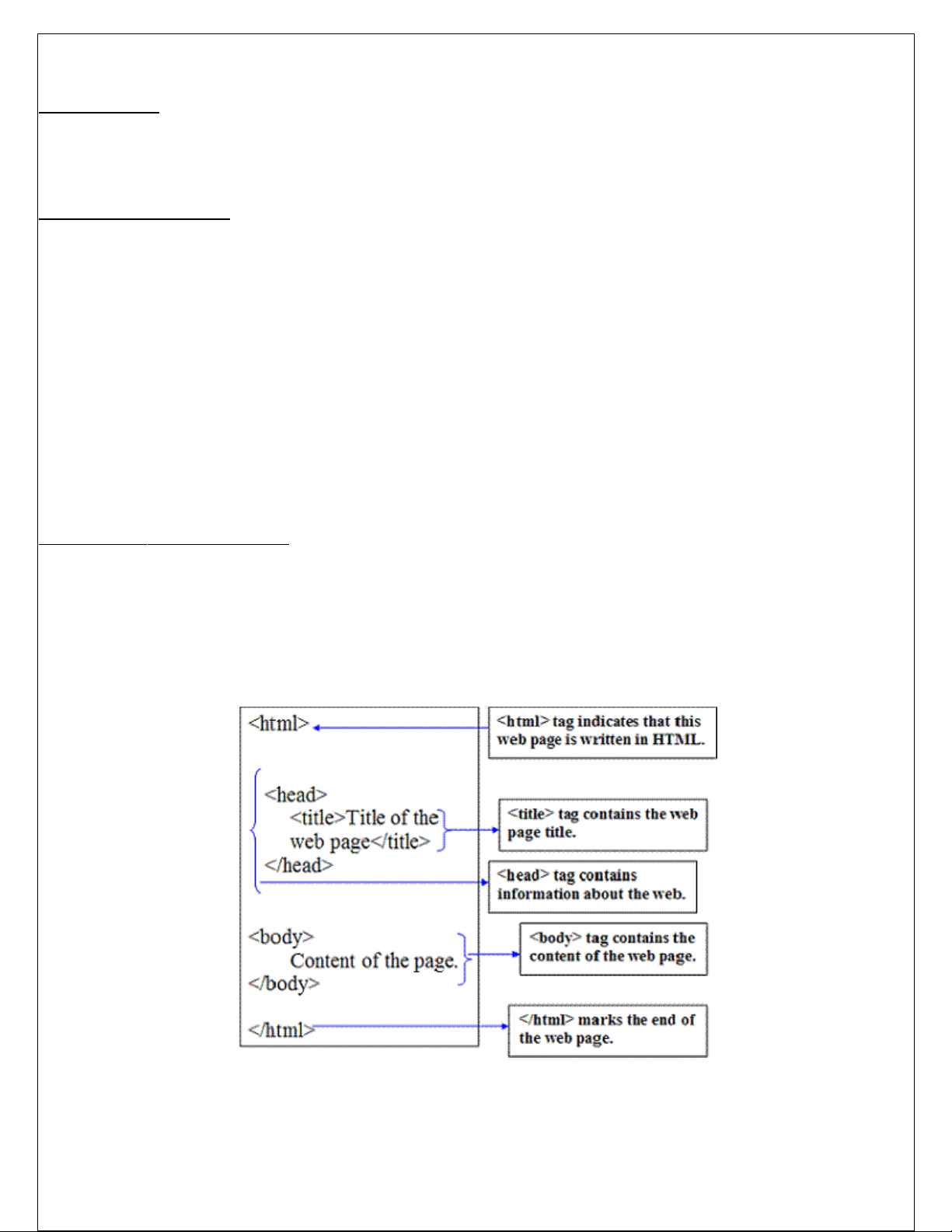
Structure of HTML Program
All HTML documents follow the same basic structure. They have the root tag as , which
contains tag and tag. The head tag is used for control information by the browser
and the body tag contains the actual user information that is to be displayed on the screen. The basic
document is shown below.
Basic HTML Document
In its simplest form, following is an example of an HTML document −Live Demo
This is document title
This is a heading
paragraph content
Above example of HTML document uses the following tags –
This tag defines the document type and HTML version.
The declaration tag is used by the web browser to understand the version of
the HTML used in the document.
**** :This tag informs the browser that it is an HTML document. Text between html tag describes the web document. It is a container for all other elements of HTML except : It should be the first element inside the element, which contains the metadata (information about the document). It must be closed before the body tag opens. : it is used to add title of that HTML page which appears at the top of the browser window. It must be placed inside the head tag and should close immediately. (Optional) <body> : Text between body tag describes the body content of the page that is visible to the end user. This tag contains the main content of the HTML document. <h1> : Text between <h1> tag describes the first level heading of the webpage. <p> : Text between <p> tag describes the paragraph of the webpage.
HTML Tags
HTML tags are like keywords which defines that how web browser will format and display the content.
HTML tags are element names surrounded by angle brackets< >:
Every tag in HTML perform different tasks.
<tagname>content goes here...</tagname>
HTML tags normally come in pairs like <p> and </p>
The first tag in a pair is the start tag, the second tag is the end tag
Heading Tags Any document starts with a heading. You can use different sizes for your headings. HTML also has six levels of headings, which use the elements , , , , , and . defines the most important heading. defines the least important heading:
Heading Example
This is heading1
This is heading2
This is heading3
This is heading4
This is heading5
This is heading6
Example 2:
My sample web page
heading level 1
heading level 2
heading level 3
heading level 4
heading level 5
heading level 6
HTML Paragraphs A paragraph always starts on a new line, and is usually a block of text. The HTML
element defines a paragraph. A paragraph always starts on a new line, and browsers automatically add some white space before and after a paragraph. Example
This is first paragraph.
This is second paragraph.
This is third paragraph.
HTML Anchor: The HTML anchor tag defines a hyperlink that links one page to another page. It can create hyperlink to other web page as well as files, location, or any URL. The "href" attribute is the most important attribute of the HTML a tag. and which links to destination page or URL. The syntax of HTML anchor tag is given below. Link Text Let's see an example of HTML anchor tag.
Click for Second Page
Specify a location for Link using target attribute: If we want to open that link to another page then we can use target attribute of tag. With the help of this link will be open in next page. Sr.N o Option & Description 1 _blank Opens the linked document in a new window or tab. 2 _self Opens the linked document in the same frame. 3 _parent Opens the linked document in the parent frame. 4 _top Opens the linked document in the full body of the window. 5 Targetframe Opens the linked document in a named targetframe. o The target attribute can only use with href attribute in anchor tag. o If we will not use target attribute then link will open in same page.
Appearance of HTML anchor tag
An unvisited link is displayed underlined and blue. A visited link displayed underlined and purple. An active link is underlined and red.
Intra document hyperlinking
Go to the News
Welcome
This paragraph welcomes you.
About
This paragraph talks about us.
News
This is the section your link will go to.
HTML Elements
An HTML element usually consists of a start tag and end tag, with the content inserted in between: Content goes here... The HTML element is everything from the start tag to the end tag:
My first paragraph.
Empty HTML Elements
HTML elements with no content are called empty elements.
is an empty element without a closing tag (the
tag defines a line break). Empty elements can be "closed" in the opening tag like this:
. HTML5 does not require empty elements to be closed. But if you want stricter validation, or if you need to make your document readable by XML parsers, you must close all HTML elements properly.
HTML Attributes
All HTML elements can have attributes Attributes provide additional information about an element Attributes are always specified in the start tag Attributes usually come in name/value pairs like: name="value" The width and height Attributes Images in HTML have a set of size attributes, which specifies the width and height of the image: Example
The style Attribute
The style attribute is used to specify the styling of an element, like color, font, size etc. Example
I am a paragraph
HTML Comment Tags
You can add comments to your HTML source by using the following syntax:
Notice that there is an exclamation point (!) in the opening tag, but not in the closing tag. Note: Comments are not displayed by the browser, but they can help document your HTML source code.
With comments you can place notifications and reminders in your HTML: Example
This is a paragraph.
List tags in HTML
One of the most effective ways of structuring a web site is to use lists. HTML provides three types of list i.e., bulleted list, numbered list and a definition list. Lists can be easily embedded easily in another list to provide a complex but readable structures. The different tags used in lists are explained below. There three types of list Unordered list or Bulleted list Ordered list or Numbered list Definition list
…..
The ordered (numbered) and unordered (bulleted) lists are each made up of sets of list items. This tag is used to write list items
Unordered list or Bulleted list
An unordered list starts with the **** tag. Each list item starts with the **** tag. The list items will be marked with bullets (small black circles) by default: Example
Coffee Tea Milk
The type property is used to define the style of the list item marker: Value Description Disc Sets the list item marker to a bullet (default) Circle Sets the list item marker to a circle Square Sets the list item marker to a square None The list items will not be marked Example - Disc
Coffee Tea Milk
Example
ordered list or Numbered list
ordered list or Numbered list demo
HTML Java JavaScript SQL
HTML Description Lists HTML also supports description lists. A description list is a list of terms, with a description of each term. The **** tag defines the description list, the **** tag defines the term (name), and the **** tag describes each term:
Example
Coffee
- black hot drink Milk
- white cold drink
Example:
HTML is a markup language Java is a programming language and platform JavaScript is a scripting language SQL is a query language
Tables
Tables in HTML allow us to organize information in a row and column format. Tables have two uses: structuring a piece of information and structuring the whole webpage. Many best designed websites on the internet are based around tables. Alternatively, you can use structure a webpage using frames.
Basic Table Tags :
**……………………………….
Everything between these two tags will be a part of the table. The attributes control the formatting of the table as a whole, but not the items in each cell. Attribute Description Align Specifies the horizontal alignment of the table. Default value is left. Border Specified the width of border around table. Cellpadding Specifies the spacing between cell border and text. Default value is 1 Cellspacing Specifies the spacing between cells of the table. Default value is 2 Width Specifies table width Height Specifies table height** Table Row : Each row of the table is created using. It has the following form
…. Table Data : used to represent table cell and it data. ….
Table Heading : Used to create headings for columns in a table. …. The attributes of , , are describe below
The src attribute should point to image or a document which can be displayed within the frame. The name attribute specifies the name of the frame The scrolling attribute specifies three values: yes, No, auto Example:
Frame Demo
HTML colors are specified using predefined color names, or RGB, HEX values.
Color Names
In HTML, a color can be specified by using a color name: Tomato Orange Dodger Blue MediumSeaGreen Gray SlateBlue Violet LightGray
Example
**Hello World
Lorem ipsum...
**
Text Color
Example
Hello World
Hello World
Hello World
Border Color
Example
Hello World
Hello World
Hello World
Styling HTML with CSS
CSS stands for C ascading S tyle S heets.
CSS describes how HTML elements are to be displayed on screen, paper, or in
other media. CSS saves a lot of work. It can control the layout of multiple web
pages all at once.
CSS can be added to HTML elements in 3 ways:
Inline - by using the style attribute in HTML elements
Internal - by using a
This is a heading
This is a paragraph.
External CSS
An external style sheet is used to define the style for many HTML pages.
With an external style sheet, you can change the look of an entire web site, by changing one file! To use an external style sheet, add a link to it in the section of the HTML page: Example
Type Description
Defines a one-line text input field
Defines a radio button (for selecting one of many choices)
Defines a submit button (for submitting the form)
Text Input
**** defines a one-line input field for text input : Example:
First name:
Last name:
Note that the form itself is not visible.
Also note that the default width of a text input field is 20 characters.
This is how it will look like in a
browser: First name:
Last name:
**Note: The form itself is not visible. Also note that the default width of a text field is 20 characters. Radio Button Input ** defines a radio button. Radio buttons let a user select ONE of a limited number of choices: **Example:
Male
Female
Other ** This is how the HTML code above will be displayed in a browser: Male
Female Other **The Submit Button ** defines a button for submitting the form data to a form-handler. The form-handler is typically a server page with a script for processing input data. The form-handler is specified in the form's action attribute:
Example
First name:
Last name:
This is how the HTML code above will be displayed in a browser: First name: Last name:
The Element
The **** element defines a drop-down list :
Example:
The