


Study with the several resources on Docsity
Earn points by helping other students or get them with a premium plan
Prepare for your exams
Study with the several resources on Docsity
Earn points to download
Earn points by helping other students or get them with a premium plan
A lab assignment for a computer organization/architecture course, focusing on designing a modulo-4 counter using flip-flops. The assignment includes building a 'silly circuit' with two flip-flops as a prerequisite, understanding the emulation tool, and creating a 'one hot' modulo-4 counter. The document also covers the placement and movement of routing points in the multi-media logic tool.
Typology: Lab Reports
1 / 4
This page cannot be seen from the preview
Don't miss anything!


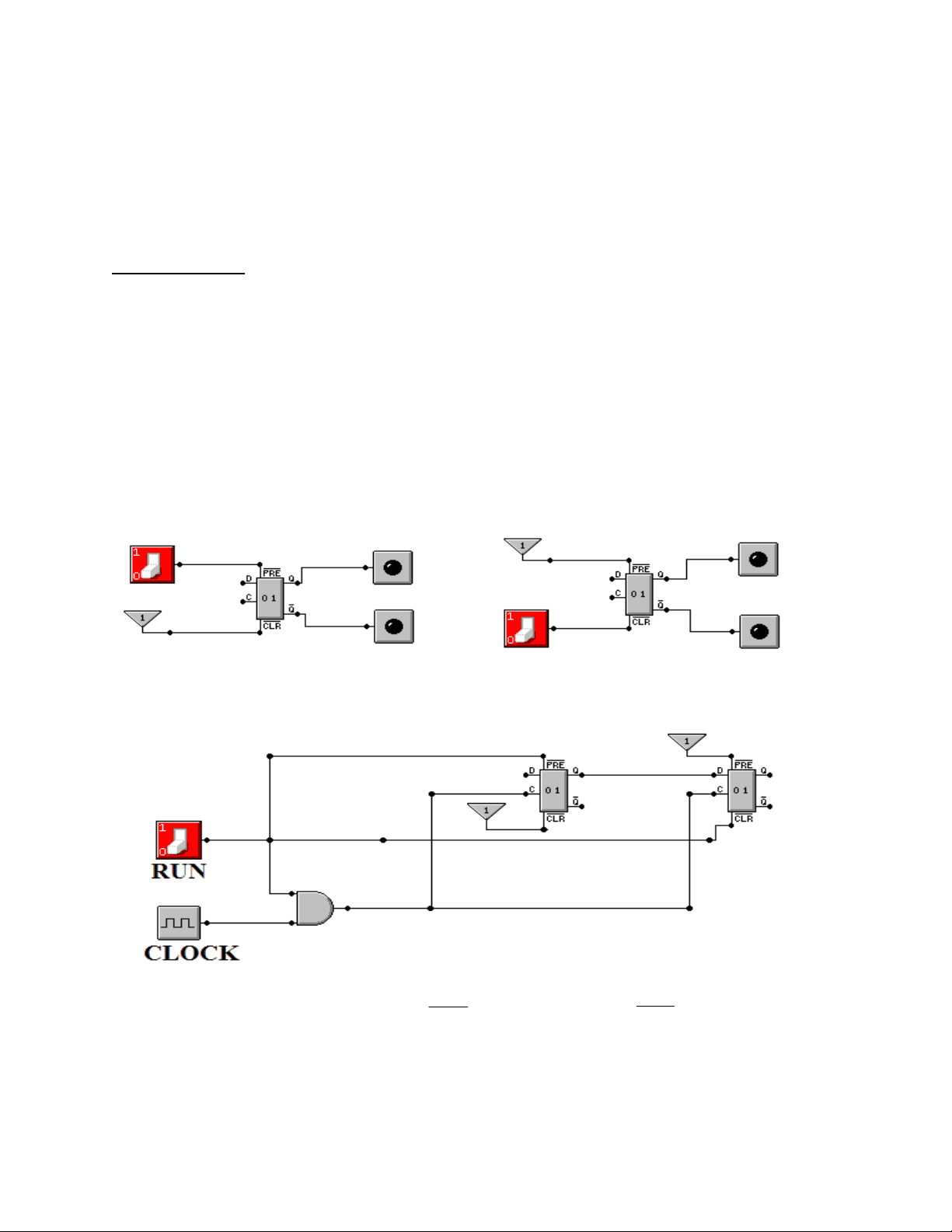
The purpose of this lab is to use a circuit emulation tool to continue our investigation of simple D flip–flops, to understand better how to use the emulation tool, and to design a simple “one hot” modulo–4 counter. We begin with a simpler design with two flip–flops. The Silly Circuit We begin with a circuit that has two flip–flops and no apparent use. The purpose of this first exercise is to hook up two D flip–flops in a circuit that demonstrates a few features. The two flip–flops will be labeled FF1 and FF2. The design specifications are as follows: FF1 this will be initialized to 1. It will have input from a switch. FF2 this will be initialized to 0. It will have its input from the output of flip–flop 1. Here is the basic idea for initializing the flip–flops. The circuit on the left shows a flip–flop that is initialized to Q = 1; this is used for FF1. The circuit on the right shows a flip–flop that is initialized to Q = 0; this is used for FF2. RUN = 0 Flip–flop is preset to Q = 1 RUN = 0 Flip–flop is cleared to Q = 0. The first step of this lab is to lay down the basic structure. In this figure, we see the following features that will be used in the final circuit.
An Aside: Moving the Dots It has been my experience that placing and moving the routing points, also called “dots”, can be somewhat challenging. The method to use is certainly not obvious. The Multi–Media logic tool has rather primitive drawing algorithms. This may result in a signal line being drawn straight through an element that relates to another part of the circuit. In order to create an easily read drawing, one must use the routing points. This leads to the question of how one places and moves these dots. The routing points, which the tool calls “nodes”, can be placed with the Node Tool. Often, this placement is somewhat rough. The way to move the node to a more desirable location is to use the Selector Tool. With the Selector Tool active place the arrow slightly below the routing point and left–click the mouse. The routing point will be highlighted as above and the mouse can be used to relocate the node. Implementing the Silly Circuit In this part of the lab, build upon the circuit shown above. Here are the criteria
With the three fragmentary circuits above in mind, we may now show the complete circuit. The student should implement this circuit and observe the following behavior.