
Compiler construction paper, Exams of Compiler Construction

compiler construction exam to build a compiler in c programming language

Typology: Exams

2019/2020

Uploaded on 12/22/2020

bisma-arif
bisma-arif 🇵🇰

1 document

1 / 4

Toggle sidebar

This page cannot be seen from the preview

Don't miss anything!

bg1
1
Due Date: Saturday, November 22, 2020, 11:59PM
CSC3201
Fall 2020
MID EXAM (SZABIST)
Construction of Lexical Analyzer
Problem Statement:
For this assignment you will write a lexical analyzer, also called a scanner, using a lexical
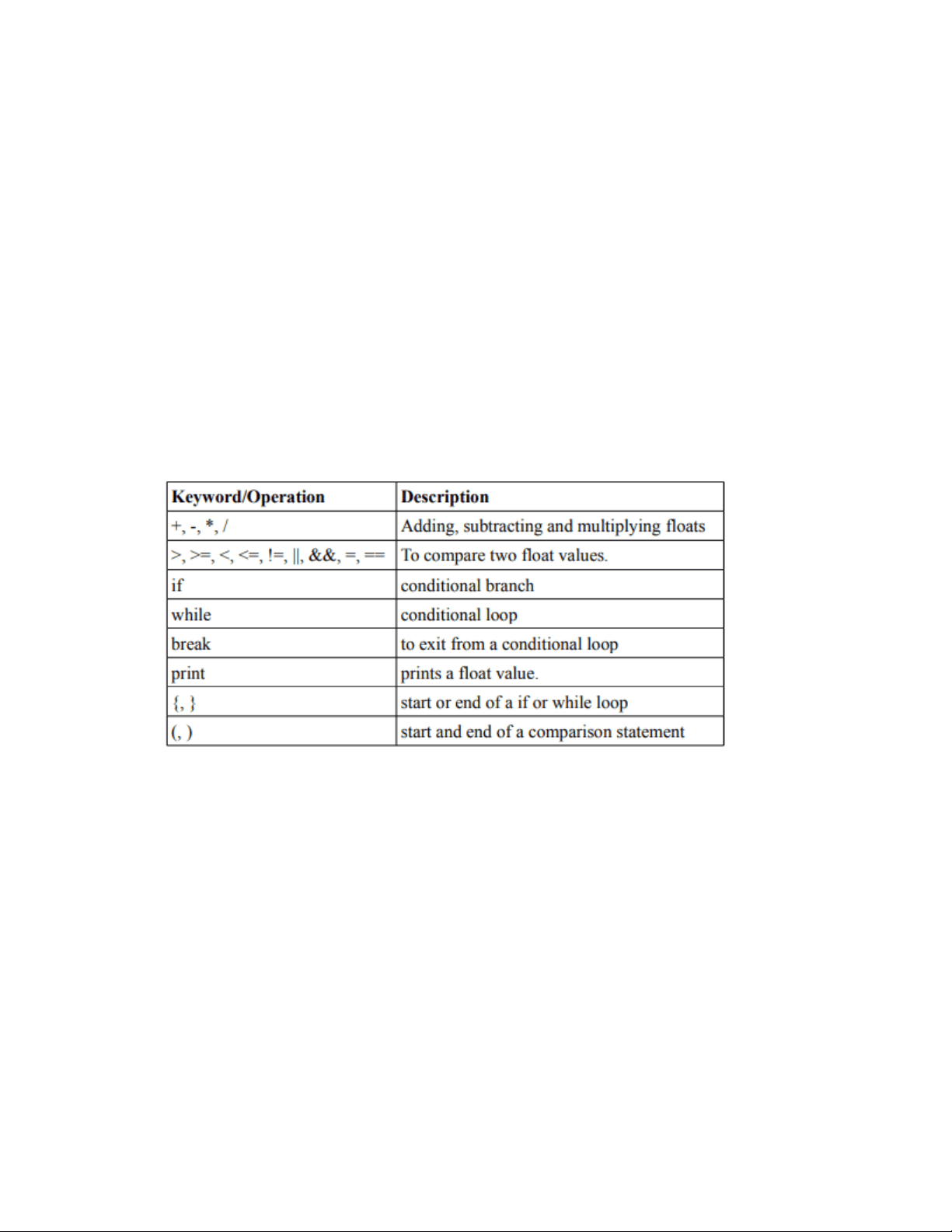
analyzer generator. The set of possible tokens for Fall20Lang (Fall20 Language) are given in
following tokens.
Valid Tokens in Fall20Lang
Instruction for possible inputs:
Fall20Lang only supports four bytes signed float data types. A float value may be stored in an
identifier. An identifier is not needed to be defined before being used. The valid name of
identifier could have letters followed by some optional digits (Example: temp12 and temp are
valid identifiers but temp1z is not valid). All identifiers have global access. That means an
identifier used inside a loop for the first time may be reused outside of that loop too. There is
no semicolon (;) in the language and a newline is taken as an end of a statement. A comment
starts with two front slashes like in Java and C.
Format of Float:
The Fall20Lang support 4 byte long signed float identifiers. The format of a float is optional
sign, followed by some digits, followed by an optional "." and some more digits. For example:
7, 7.3 and 789.23 are valid float values.
pf3
pf4

Partial preview of the text

Download Compiler construction paper and more Exams Compiler Construction in PDF only on Docsity!

Due Date: Saturday, November 22 , 2020, 11:59PM

CSC

Fall 2020

MID EXAM (SZABIST)

Construction of Lexical Analyzer

Problem Statement:

For this assignment you will write a lexical analyzer, also called a scanner, using a lexical

analyzer generator. The set of possible tokens for Fall20Lang (Fall20 Language) are given in

following tokens.

Valid Tokens in Fall20Lang

Instruction for possible inputs:

Fall20Lang only supports four bytes signed float data types. A float value may be stored in an

identifier. An identifier is not needed to be defined before being used. The valid name of

identifier could have letters followed by some optional digits (Example: temp12 and temp are

valid identifiers but temp1z is not valid). All identifiers have global access. That means an

identifier used inside a loop for the first time may be reused outside of that loop too. There is

no semicolon (;) in the language and a newline is taken as an end of a statement. A comment

starts with two front slashes like in Java and C.

Format of Float:

The Fall20Lang support 4 byte long signed float identifiers. The format of a float is optional

sign, followed by some digits, followed by an optional "." and some more digits. For example:

7, 7.3 and 789.23 are valid float values.

Wrong Input

When you encounter a string that doesn’t match any of the above cases then you should print

an error message indicating the line number in which the error occurs, and then your

program should abort execution.

Example Code:

Following is an example code written in Fall20Lang for the Fibonacci series first 7 numbers.

This code could be in a file named input.l

Compiling and Running your Flex Code

After you write your lex program and save it in a file, e.g. scan.l, you can compile the program

by executing the following commands:

flex scan.l gcc

lex.yy.c - o scan

where scan is the resulting executable file. To run your program just type scan. The keyboard

is the standard input of your program. When your input is from a file, e.g. input.txt, you can

use the redirection for input: scan < input.txt.

The computer monitor is the standard output of your program. To save the output of your

program to a file, e.g. output.txt, you can use the redirection for output: scan > output.txt.

Output Invalid character ';' at line number = Invalid character '&' at line number = Invalid character '.' at line number = Invalid character ';' at line number = Invalid character '!' at line number = Invalid character '.' at line number = Invalid character '!' at line number = Invalid character '!' at line number = Requirements

Your program may be written in automated scanner generator like Flex, Jlex, Irony or you

can write your own hand-written scanner on Python, R, C, C++, Java, or C#. (If you would like

to use a different programming language, please discuss it with me.)

Submission Instruction

  • This exam must be attempt in the form of group.
  • Group members comprises one or two person.
  • Each group should only submit one soft copy of solution containing your flex code

together with the output of your program for the three test files

  • Submit the deliverables at google classroom.
  • Marks will be given on the basis of presentation. 1. Hand Out Date **Week-commencing Saturday 21 November, 2020.
  1. Hand In Date** Week-commencing Sunday 22 November, 2020. Penalties
  • Work submitted any later than this will receive a mark of zero. Plagiarism

Very severe penalties will apply if you copy or otherwise reuse the work of others.

Note: This exam may be subject to oral discussion.