Download CCNA Routing and Switching Lab 2.2.2.5 and more Exercises Information Technology in PDF only on Docsity!
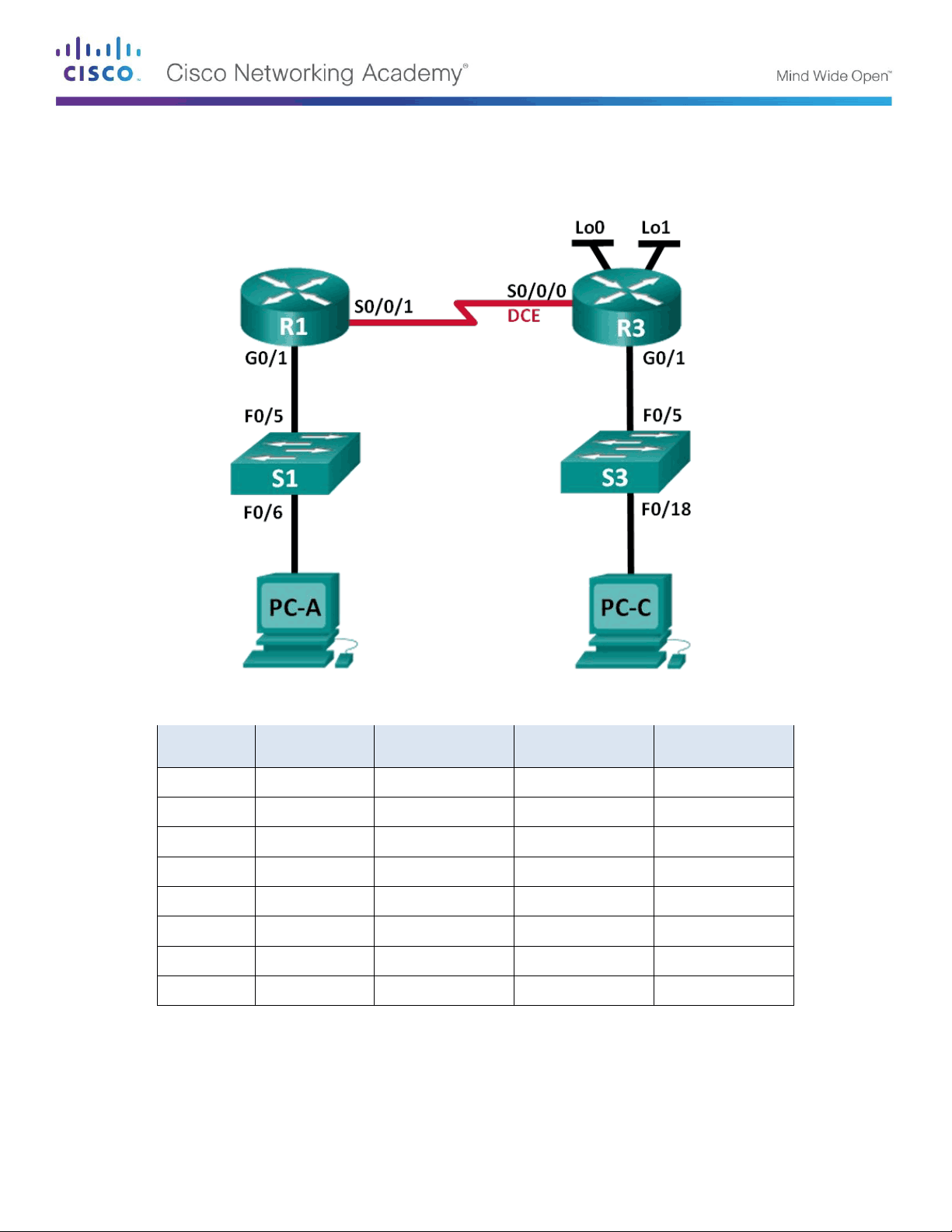
Topology
Addressing Table
Device Interface IP Address Subnet Mask Default Gateway
R1 G0/1 192.168.0.1 255.255.255.0 N/A
S0/0/1 10.1.1.1 255.255.255.252 N/A
R3 G0/1 192.168.1.1 255.255.255.0 N/A
S0/0/0 (DCE) 10.1.1.2 255.255.255.252 N/A
Lo0 209.165.200.225 255.255.255.224 N/A
Lo1 198.133.219.1 255.255.255.0 N/A
PC-A NIC 192.168.0.10 255.255.255.0 192.168.0.
PC-C NIC 192.168.1.10 255.255.255.0 192.168.1.
Objectives
Part 1: Set Up the Topology and Initialize Devices Part 2: Configure Basic Device Settings and Verify Connectivity
Part 3: Configure Static Routes Configure a recursive static route. Configure a directly connected static route. Configure and remove static routes.
Part 4: Configure and Verify a Default Route
Background / Scenario
A router uses a routing table to determine where to send packets. The routing table contains a set of routes that describe which gateway or interface the router uses to reach a specified network. Initially, the routing table contains only directly connected networks. To communicate with distant networks, routes must be specified and added to the routing table. In this lab, you will manually configure a static route to a specified distant network based on a next-hop IP address or exit interface. You will also configure a static default route. A default route is a type of static route that specifies a gateway to use when the routing table does not contain a path for the destination network. Note : This lab provides minimal assistance with the actual commands necessary to configure static routing. However, the required commands are provided in Appendix A. Test your knowledge by trying to configure the devices without referring to the appendix. Note : The routers used with CCNA hands-on labs are Cisco 1941 Integrated Services Routers (ISRs) with Cisco IOS Release 15.2(4)M3 (universalk9 image). The switches used are Cisco Catalyst 2960s with Cisco IOS Release 15.0(2) (lanbasek9 image). Other routers, switches, and Cisco IOS versions can be used. Depending on the model and Cisco IOS version, the commands available and output produced might vary from what is shown in the labs. Refer to the Router Interface Summary Table at the end of this lab for the correct interface identifiers. Note : Make sure that the routers and switches have been erased and have no startup configurations. If you are unsure, contact your instructor.
Required Resources
2 Routers (Cisco 1941 with Cisco IOS Release 15.2(4)M3 universal image or comparable) 2 Switches (Cisco 2960 with Cisco IOS Release 15.0(2) lanbasek9 image or comparable) 2 PCs (Windows 7, Vista, or XP with terminal emulation program, such as Tera Term) Console cables to configure the Cisco IOS devices via the console ports Ethernet and serial cables as shown in the topology
Part 1: Set Up the Topology and Initialize Devices
Step 1: Cable the network as shown in the topology.
Step 2: Initialize and reload the router and switch.
Part 2: Configure Basic Device Settings and Verify Connectivity
In Part 2, you will configure basic settings, such as the interface IP addresses, device access, and passwords. You will verify LAN connectivity and identify routes listed in the routing tables for R1 and R3.
d. View the routing table information for R3. What networks are present in the Addressing Table in this lab, but not in the routing table for R3?
Why are all the networks not in the routing tables for each of the routers?
Part 3: Configure Static Routes
In Part 3, you will employ multiple ways to implement static and default routes, you will confirm that the routes have been added to the routing tables of R1 and R3, and you will verify connectivity based on the introduced routes. Note : This lab provides minimal assistance with the actual commands necessary to configure static routing. However, the required commands are provided in Appendix A. Test your knowledge by trying to configure the devices without referring to the appendix.
Step 1: Configure a recursive static route.
With a recursive static route, the next-hop IP address is specified. Because only the next-hop IP is specified, the router must perform multiple lookups in the routing table before forwarding packets. To configure recursive static routes, use the following syntax: Router(config)# ip route network-address subnet-mask ip-address a. On the R1 router, configure a static route to the 192.168.1.0 network using the IP address of the Serial 0/0/0 interface of R3 as the next-hop address. Write the command you used in the space provided.
b. View the routing table to verify the new static route entry. How is this new route listed in the routing table?
From host PC-A, is it possible to ping the host PC-C? These pings should fail. If the recursive static route is correctly configured, the ping arrives at PC-C. PC-C sends a ping reply back to PC-A. However, the ping reply is discarded at R3 because R3 does not have a return route to the 192.168.0.0 network in the routing table.
Step 2: Configure a directly connected static route.
With a directly connected static route, the exit-interface parameter is specified, which allows the router to resolve a forwarding decision in one lookup. A directly connected static route is typically used with a point-to- point serial interface. To configure directly connected static routes with an exit interface specified, use the following syntax: Router(config)# ip route network-address subnet-mask exit-intf a. On the R3 router, configure a static route to the 192.168.0.0 network using S0/0/0 as the exit interface. Write the command you used in the space provided. b. View the routing table to verify the new static route entry. How is this new route listed in the routing table?
c. From host PC-A, is it possible to ping the host PC-C? This ping should be successful. Note : It may be necessary to disable the PC firewall to ping between PCs.
Step 3: Configure a static route.
a. On the R1 router, configure a static route to the 198.133.219.0 network using one of the static route configuration options from the previous steps. Write the command you used in the space provided.
b. On the R1 router, configure a static route to the 209.165.200.224 network on R3 using the other static route configuration option from the previous steps. Write the command you used in the space provided.
c. View the routing table to verify the new static route entry. How is this new route listed in the routing table?
d. From host PC-A, is it possible to ping the R1 address 198.133.219.1? This ping should be successful.
Step 4: Remove static routes for loopback addresses.
a. On R1, use the no command to remove the static routes for the two loopback addresses from the routing table. Write the commands you used in the space provided.
b. View the routing table to verify the routes have been removed. How many network routes are listed in the routing table on R1? Is the Gateway of last resort set?
Part 4: Configure and Verify a Default Route
In Part 4, you will implement a default route, confirm that the route has been added to the routing table, and verify connectivity based on the introduced route. A default route identifies the gateway to which the router sends all IP packets for which it does not have a learned or static route. A default static route is a static route with 0.0.0.0 as the destination IP address and subnet mask. This is commonly referred to as a “quad zero” route. In a default route, either the next-hop IP address or exit interface can be specified. To configure a default static route, use the following syntax: Router(config)# ip route 0.0.0.0 0.0.0.0 { ip-address or exit-intf } a. Configure the R1 router with a default route using the exit interface of S0/0/1. Write the command you used in the space provided.
b. View the routing table to verify the new static route entry. How is this new route listed in the routing table?
Appendix A: Configuration Commands for Parts 2, 3, and 4
The commands listed in Appendix A are for reference only. This Appendix does not include all the specific commands necessary to complete this lab.
Basic Device Settings
Configure IP settings on the router. R3(config)# interface s0/0/ R3(config-if)# ip address 10.1.1.2 255.255.255. R3(config-if)# clock rate 128000 R3(config-if)# no shutdown
Static Route Configurations
Configure a recursive static route. R1(config)# ip route 192.168.1.0 255.255.255.0 10.1.1. Configure a directly connected static route. R3(config)# ip route 192.168.0.0 255.255.255.0 s0/0/ Remove static routes. R1(config)# no ip route 209.165.200.224 255.255.255.224 serial0/0/ or R1(config)# no ip route 209.165.200.224 255.255.255.224 10.1.1. or R1(config)# no ip route 209.165.200.224 255.255.255.
Default Route Configuration
R1(config)# ip route 0.0.0.0 0.0.0.0 s0/0/