Rapid City Catholic School System, Exams of Business Statistics

implementing a consistent set of standards, including RCCSS logos, we can build a strong identity. ... St. Thomas More Logo. St. Thomas More Academic Logo.

Typology: Exams

2021/2022

Uploaded on 07/04/2022

jacqueline_nel
jacqueline_nel 🇧🇪

4.4

(242)

3.2K documents

1 / 2

Toggle sidebar

This page cannot be seen from the preview

Don't miss anything!

bg1
Useful Apps and Websites
Writing Tool
The Manchester Phrasebank is a resource for academic writers with examples of
common phrases according to each main section of a main research paper. It has many
examples listed under different situations: describing the method process in
chronological order, stating negative results, stating the implications, etc. The phrases,
and the headings under which they are presented, can be used to help you think about
the content and organization of your work. It can be helpful when you are stuck on how
to start the paper or need to build up sentence variation
Dalhousie Writing Resources has a collection of writing tip sheets and writing samples
for different subjects: biology, social works, medical, management, business, etc. Under
the “Graduate Students” section, you can find resources for publication, research
proposal, dissertation, academic job application, and grant writing. To prepare for
applications, look through some sample resumes under the “Writing for Work” section
for guidelines on how to highlight and quantify your previous experiences.
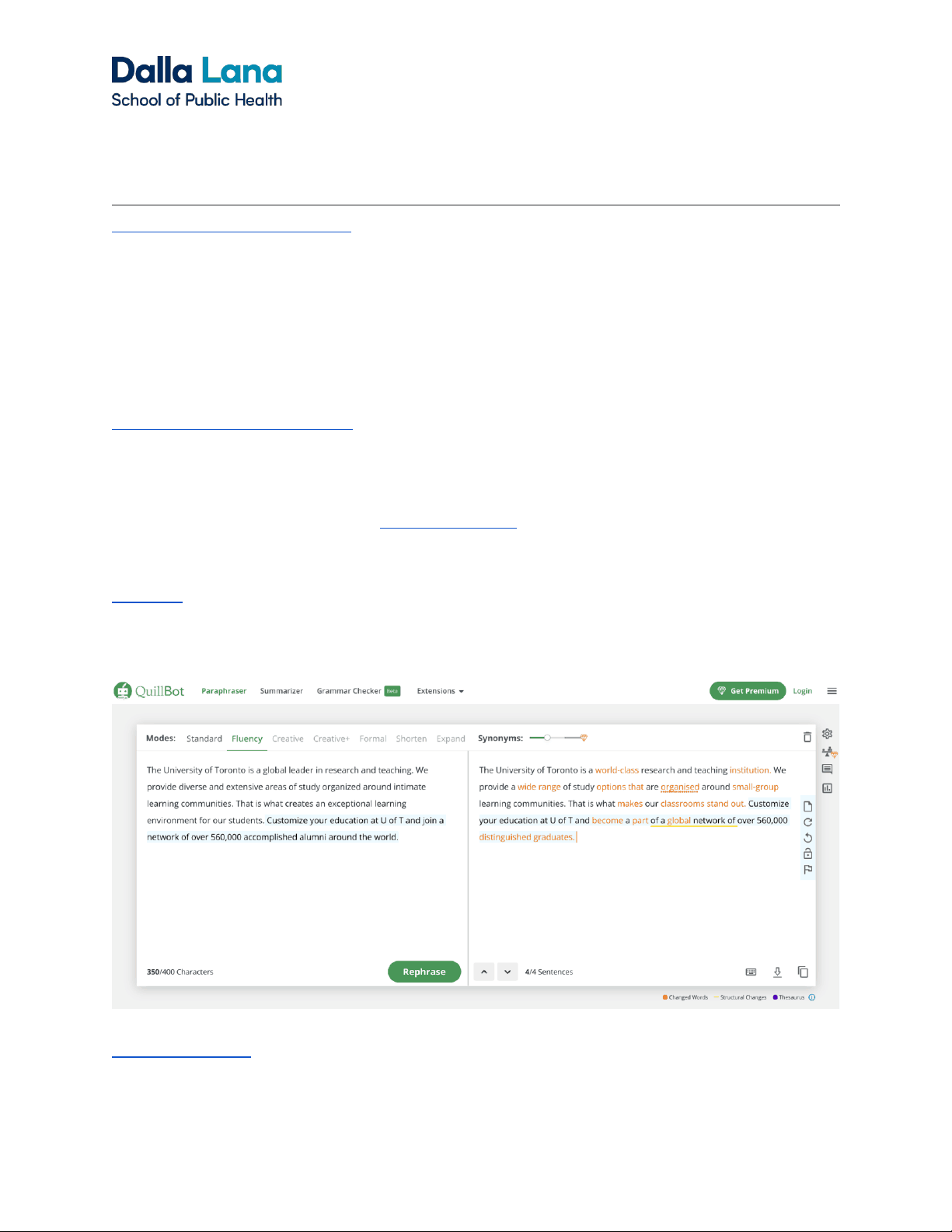
QuillBot is a website that has summarizing, paraphrasing, and grammar checking
functions. It is helpful when you want to edit certain sentences for a change of
vocabulary. The paraphrasing function can help you identify words that can be changed
with synonyms.
TwinWord Writer is a tool for finding synonyms. Copy and paste your work to the
website and click on the word you want to change. List of synonym suggestions is
given, and a dictionary is included.
pf2

Partial preview of the text

Download Rapid City Catholic School System and more Exams Business Statistics in PDF only on Docsity!

Useful Apps and Websites

Writing Tool

The Manchester Phrasebank is a resource for academic writers with examples of

common phrases according to each main section of a main research paper. It has many

examples listed under different situations: describing the method process in

chronological order, stating negative results, stating the implications, etc. The phrases,

and the headings under which they are presented, can be used to help you think about

the content and organization of your work. It can be helpful when you are stuck on how

to start the paper or need to build up sentence variation

Dalhousie Writing Resources has a collection of writing tip sheets and writing samples

for different subjects: biology, social works, medical, management, business, etc. Under

the “Graduate Students” section, you can find resources for publication, research

proposal, dissertation, academic job application, and grant writing. To prepare for

applications, look through some sample resumes under the “Writing for Work” section

for guidelines on how to highlight and quantify your previous experiences.

QuillBot is a website that has summarizing, paraphrasing, and grammar checking

functions. It is helpful when you want to edit certain sentences for a change of

vocabulary. The paraphrasing function can help you identify words that can be changed

with synonyms.

TwinWord Writer is a tool for finding synonyms. Copy and paste your work to the

website and click on the word you want to change. List of synonym suggestions is

given, and a dictionary is included.

Reference Manager

Reference managers are tools for collecting and organizing research information and

sources. It is designed to store, manage, and cite bibliographic references, such as

books and articles. Once you download the software, you can save articles onto your

desktop from websites as pdfs for highlighting and annotation. Additional plugins allow

you to directly insert citations and bibliography into word processors.

Zotero Mendeley EndNote Price Free (300MB Cloud Storage) You can maintain a library of citations and documents on ONE local computer drive without having to use Zotero’s cloud storage Free (2GB Cloud Storage) One time purchase for ~$175 (student discount) UofT’s Bookstore or EndNote’s website. Collaboration Yes Unlimited private or public groups with free account Yes Unlimited public groups, only 1 private group ( members) with free account Yes Pros Best for saving non article web pages (automatically saves non-pdf web page into pdf) Has plugin for Google Docs Can collaborate on annotating and highlighting PDFs as a group (each member’s colour is different) Has social networking features that allows you to connect with other researchers Best for doing systematic reviews and managing long documents and a large reference collection

For more comparison of the three software:

Pros & Cons of Citation Managers

Citation Managers Comparison Table

Last Updated: August 2, 202 1 Office of Practicum and Professional Development